
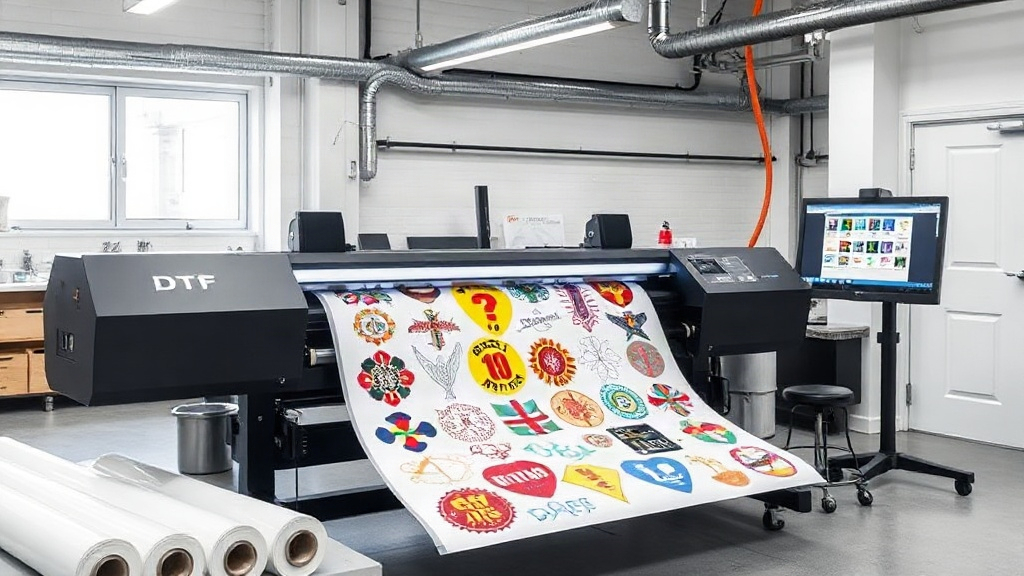
If you run a custom apparel business, you know that efficiency and cost control are everything. Every minute saved and every inch of transfer film used wisely adds up. That's where a DTF gangsheet builder comes in. This powerful tool lets you arrange multiple designs on a single sheet, maximizing your resources and minimizing waste. In this article, we'll explore what a gangsheet builder is, why it's a game-changer for DTF printing, and how to make the most of it.
What is a DTF Gangsheet Builder?
A DTF gangsheet builder is software that helps you nest multiple DTF (Direct to Film) transfers onto one large sheet. Instead of printing each design separately, you group them together, hence the term 'gangsheet'. This approach is similar to gang printing in traditional offset printing, where multiple jobs are combined on one plate. For DTF, it means you can print a variety of designs in one go, saving time and material.
Why 'Gang' Printing?
The concept of ganging up designs isn't new. It's been used in screen printing for decades to reduce setup costs. In DTF, it's even more beneficial because the film and powder are expensive. By grouping designs, you use the full width of your printer, reducing wasted film. Plus, you can optimize the layout to fit more designs per sheet, lowering your cost per transfer.
How Does a DTF Gangsheet Builder Work?
Most gangsheet builders are web-based or part of RIP software. You upload your designs, and the tool automatically arranges them on a virtual sheet, considering the dimensions of your printer and film roll. You can usually adjust spacing, rotate designs, and even nest irregular shapes to maximize density. Some advanced builders use algorithms to find the most efficient layout, saving you from manual trial and error.
Key Features to Look For
- Automatic nesting: The tool should intelligently arrange designs to minimize gaps.
- Custom sheet sizes: Support for various film widths and lengths.
- Design rotation and flipping: For optimal fit and grain direction.
- Cost calculator: Estimate film and ink usage per sheet.
- Integration with RIP: Seamless export to your printer's software.
Benefits of Using a DTF Gangsheet Builder
Investing time in learning a gangsheet builder pays off quickly. Here are the main advantages:
1. Significant Cost Savings
DTF film and powder are consumables that directly impact your bottom line. By maximizing the number of transfers per sheet, you reduce waste. For example, if you can fit 20 designs instead of 15 on the same sheet, you're saving 25% on materials. Over hundreds of sheets, that's a substantial amount.
2. Time Efficiency
Printing one sheet with many designs is faster than printing each separately. You load the film once, print once, and then apply powder and cure once. This batch processing saves hours of labor, especially for large orders with multiple designs.
3. Consistent Quality
When you print designs together, they go through the same curing and pressing conditions, ensuring consistent color and adhesion. This is particularly important for orders where multiple sizes or designs need to match.
4. Reduced Inventory Waste
Instead of printing large batches of a single design that may not sell, you can print small quantities of many designs on one sheet. This allows you to test the market without overcommitting to inventory.
How to Create an Effective Gangsheet
Creating a gangsheet is both an art and a science. Follow these steps to get it right:
Step 1: Prepare Your Designs
Ensure all designs are in the correct format (usually PNG with transparent background) and at the right resolution (300 DPI recommended). Check that colors are in CMYK if required by your printer.
Step 2: Choose the Right Sheet Size
Measure your film roll width and decide on the length. Common widths are 13", 17", and 24". The length can be as long as your printer allows, but consider handling and curing.
Step 3: Arrange Designs Smartly
Use the builder's auto-arrange feature, but don't be afraid to manually adjust. Place larger designs first, then fill gaps with smaller ones. Rotate designs if it helps them fit better. Leave a small gap (0.1-0.2 inches) between designs for easy cutting.
Step 4: Add Registration Marks
If you'll be cutting with a plotter, include registration marks. These help the cutter align accurately. Most builders have an option to add them automatically.
Step 5: Review and Export
Double-check the layout for overlaps or cut-off designs. Then export the file in your printer's preferred format (usually PDF or TIFF).
Common Mistakes to Avoid
Even with a builder, some pitfalls can reduce efficiency:
- Overcrowding: Leaving no space between designs can cause ink bleeding and make cutting difficult.
- Ignoring grain direction: Some films have a grain; rotating designs may affect stretchability.
- Forgetting about shrinkage: DTF film shrinks slightly when cured; account for that in your layout.
- Not updating software: Builders improve with updates; keep yours current for best results.
DTF Gangsheet Builder vs. Manual Layout
You might think you can arrange designs manually in a graphic program, but a dedicated builder offers automation and precision that manual methods can't match. It calculates optimal placement in seconds, saving you from tedious dragging and dropping. Moreover, it often includes features like cost estimation and integration with order management systems.
Integrating a Gangsheet Builder into Your Workflow
To get the most out of your builder, integrate it with your existing processes. For example, if you use an order management system, see if the builder can pull designs directly from orders. This reduces manual entry and errors. Also, train your staff on the tool; a little training goes a long way in boosting productivity.
Frequently Asked Questions
What is the ideal spacing between designs on a DTF gangsheet?
A gap of 0.1 to 0.2 inches (2.5 to 5 mm) is generally recommended. This allows for easy cutting and prevents ink from bleeding between designs. If you're using a plotter, check its requirements; some need more space for registration marks.
Can I use a DTF gangsheet builder for other printing methods?
While designed for DTF, some builders can also be used for DTG (Direct to Garment) or sublimation gangsheets. However, the material constraints and printing processes differ, so always test before full production.
How do I calculate the cost per transfer with a gangsheet?
Total cost of film, ink, and powder for the sheet divided by the number of transfers. Most builders include a cost calculator that factors in these variables. Keep in mind that labor and printer depreciation also contribute to overall cost.
Is a DTF gangsheet builder suitable for small businesses?
Absolutely. Small businesses often have tight budgets and need to minimize waste. A gangsheet builder helps you get the most out of every sheet, making it an essential tool for startups and established shops alike.
What file formats work best with a DTF gangsheet builder?
PNG with transparent background is the most common. Some builders accept PDF, TIFF, or even AI files. Ensure your designs are high resolution (300 DPI) and in the correct color mode (CMYK for printing).
By incorporating a DTF gangsheet builder into your production process, you'll not only save money but also streamline your workflow. Whether you're a solo entrepreneur or managing a large team, this tool can elevate your DTF printing game. Give it a try and see the difference it makes in your bottom line.